Client library
การแสดงหน้าเพจใน Mana มีองค์ประกอบที่สามารถแบ่งตามความสามารถได้ดังรูป
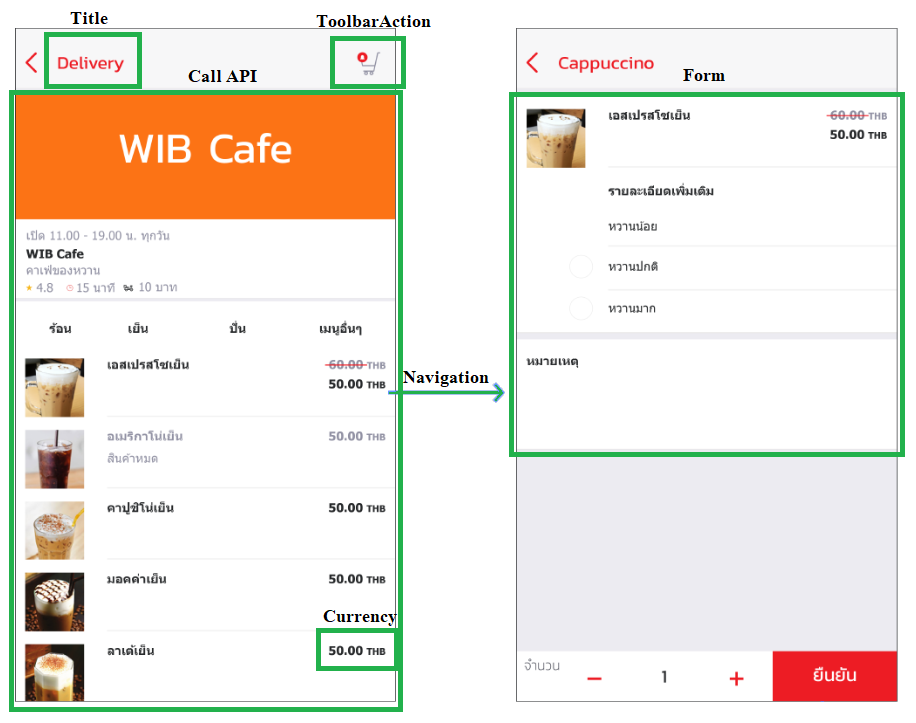
ฉะนั้นคำสั่งหรือความสามารถต่างๆที่มีใน Client library จึงแบ่งได้ตามหัวข้อด้านล่าง
Call API
การดึงข้อมูลเพื่อนำมาแสดงที่หน้าเพจ
Call API to Registered URL
.getApiData: ดึงข้อมูลจาก Server โดยการส่งระบุหน้าที่ต้องการเปิด (mcontentId) เพื่อให้ Server ตอบข้อมูลหน้านั้นกลับ.getApiDataWithEndpointId// ไม่มีตัวไหนเรียกใช้
Call Api to external
.callApiGet: ดึงข้อมูลจาก Server โดยระบุ URL ที่ได้ลงทะเบียนไว้กับ Mana.callApiPost// ไม่มีตัวไหนเรียกใช้.callApiDelete// ไม่มีตัวไหนเรียกใช้
export class DemoPage implements OnInit {

  private mcontentid = "demo";
  constructor(private svc: IonManaLib) { }

  private loadData$() {
    // เตรียมของในหน้าให้พร้อมใช้งาน
    return this.svc.initPageApi(this.mcontentid)
      .then(_ => {

        // ดึงข้อมูลจาก Server ของหน้าที่ระบุไว้
        return this.svc.getApiData(this.mcontentid);

        // ดึงข้อมูลโดยตรงผ่าน URL ที่ได้ทำการลงทะเบียนเรียบร้อยแล้ว
        // return this.svc.callApiGet(this.mcontentid, this.apiUrl);
      })
  }
}
Form
เป็นรูปแบบของการกรอกข้อมูลเพื่อส่งข้อมูลเข้าไปประมวลผลในฝั่ง Server โดยมี Form ดังต่อไปนี้
.validForm: เป็นการตรวจสอบข้อมูลให้เป็นไปตามเงื่อนไขที่กำหนดเพื่อเปิด/ปิดการใช้งานของปุ่มตกลง.submitFormData: ส่งข้อมูลไปยัง Server.confirmForm: แสดง Dlg ยืนยันการทำงานซึ่งจะได้รับค่า boolean กลับมา (resolve.isConfirm).submitFormDataWithEndpointId// ยังไม่เห็นหน้าไหนเรียกใช้ เอาออกก่อน??
export class DemoPage implements OnInit {

  public isFirstTime: boolean = true;
  public fg: FormGroup;
  constructor(private svc: IonManaLib) { }

  onSave() {
  if (this.isFirstTime) {
    this.isFirstTime = false;
  }
  this.updateValidationFormToClient();

  if (this.fg.valid) {

    let msg = this.fg.get("isAgree").value == "true" ? "ยืนยันข้อตกลง" : "ปฏิเสธข้อตกลง";

    let message = new confirmMessage("",
      "<span style=\"color: Black; \">คุณต้องการ" + msg + "</span>"
    );

    // เปิด Dialog โดยแสดงข้อความตามที่ถูก Set ไว้
    this.svc.confirmForm(message).then(resolve => {
      if (resolve.isConfirm) {
        let isAgree = this.fg.get("isAgree").value;
        this.fg.get("isAgree").setValue(isAgree == "true");
        // ส่งข้อมูลไปยัง Server
        this.svc.submitFormData(this.mcontentid, this.fg.value);
      }
    });
  }
}

  // เช็คความถูกต้องของข้อมูลเพื่อเปิด/ปิดการใช้งานของปุ่มตกลง
  // ถ้าเป็น True ปุ่มจะสามารถกดได้แต่ในทางตรงข้ามถ้าเป็น False ปุ่มจะไม่สามารถกดได้
  updateValidationFormToClient() {
    this.svc.validForm(this.isFirstTime || this.fg.valid)
  }
}
.selectImage: เลือกรูปที่อยู่ในฟอร์ม //ex:merchant-profile-image-edit รอตัวใหม่ของพี่โต??.showOptionDialog: คำสั่งเปิด Dialog โดยต้องระบุ Id ของหน้าที่จะใช้เป็น Dialog และส่งค่า DefaultValue ไปด้วย.initOptionDialog: เตรียมหน้าให้พร้อมสำหรับแสดงข้อมูลใน Dialog โดยมีข้อมูล DefaultValue ที่ถูกส่งมาจากหน้าก่อนหน้านี้
export class DemoPage implements OnInit {

  private mcontentid: string = "demo";
  constructor(private svc: IonManaLib) { }

  openMobileDialog() {
    let mcid_optiondialog = "openDialog";
    //สั่งเปิด Dialog โดยระบุหน้าที่จะเปิดและกำหนดค่า DefaultValue ส่งไปด้วย
    this.svc.showOptionDialog(mcid_optiondialog, {}).then((response) => {
      let status = response.isOk ? "ok" : "cancel";
      if (status == "ok") {
        // Do something
      }
    });
  }
}

// -----------------------------------------

export class OpenDialogPage implements OnInit {

  private mcontentid: string = "openDialog";
  constructor(private svc: IonManaLib) { }

  // คำสั่งพื้นฐานที่ทุกหน้าควรจะใช้ในการเตรียมหน้าเพจและดึงข้อมูลจาก Server
  private loadData$() {
    return this.svc.initPageApi(this.mcontentid)
      .then(_ => {
        return this.svc.getApiData(this.mcontentid);
      })
  }

  private loadDefault$() {
    // เตรียมของในหน้าให้พร้อมสำหรับเรียกคำสั่งเปิด Dialog
    return this.svc.initPageApi(this.mcontentid)
      .then(_ => {
        return this.initOptionDialog$();
      })
  }

  private initOptionDialog$() {
    // แสดง Dialog โดยรับข้อมูล DefaultValue ที่ส่งมา และเมื่อทำงานในหน้านี้เสร็จจึงส่งข้อมูลกลับไปที่หน้าเพจเพื่อทำงานต่อ
    return this.svc.initOptionDialog(this.mcontentid, (response) => {
      if (response == "ok") {
        // Do something
      }
      else {
        // Do something
      }
    });
  }
}
.customNumpad: แสดงแป้นคีย์บอร์ดที่สามารถคีย์ได้เฉพาะตัวเลขเท่านั้น
ionic
    <ion-label for="customInputAmount">
        <h2>จำนวนเงินที่ต้องการเติม</h2>
    </ion-label>
    <ion-input type="text" id="customInputAmount" customInput="true" ></ion-input>

html
    <label for="customInputAmount">จำนวนเงินที่ต้องการเติม</label>
    <input customInput="true" type="text" class="form-control" id="customInputAmount">
GPS
.getGpsLocationใช้ gps หัวด้านบนของมานะ // ยังไม่เห็นหน้าไหนเรียกใช้ เอาออกก่อน??.setGpsSection: ใช้กำหนดตำแหน่ง GPS ที่อยู่ในแสดงใน Content ด้านบนของมานะ
export class DemoPage implements OnInit {

  constructor(private svc: IonManaLib) { }

  ionViewDidEnter() {
    let load$ = this.loadData$();
    this.formData$ = load$;
    load$.then(it => {
      let location = it.address.location;
      //ตั้งค่า GPS
      this.svc.setGpsSection(location.title, location.realm, location.subDistrict, location.district, location.province, location.postalCode, location.accuracy, location.geolocation.latitude, location.geolocation.longitude, location.phoneNumber, location.remark);
      this.hasLoaded = it ? "y" : "n";
    });
    this.updateValidationFormToClient();
  }
}
Title
เป็นการกำหนดหัวเรื่อง/ชื่อหน้า ให้กับเพจนั้นๆ ซึ่งโดยทั่วไปสามารถกำหนดหัวเรื่องได้จาก html โดยตรงหรือกำหนดจากข้อมูลที่ได้รับจากฝั่ง Server ซึ่งหากเป็นอย่างหลังจำเป็นจะต้องเรียกใช้คำสั่ง .initPageApi อีกครั้งหลังได้รับข้อมูลเพื่อทำการ Set tiltle ให้กับหน้านั้นๆ
export class DemoPage implements OnInit {

  public title = "ร้านของคุณ";
  private mcontentid = "merchant";
  constructor(private svc: IonManaLib) { }

  ionViewDidEnter() {
    let load$ = this.loadData$();
    this.data$ = load$;
    load$.then((it: any) => {
      this.title = it.name != null ? it.name : this.title;
      // ใช้คำสั่ง initPageApi อีกครั้งหลังได้รับข้อมูล
      this.svc.initPageApi(this.mcontentid);
    });
  }
}
ToolbarAction
.addToolbarAction : ปุ่มเมนู ShortCut ที่แสดงด้านบนขวาของแอพโดยจะทำงานตามฟังก์ชั่นที่ถูกเขียนไว้
export class DemoPage implements OnInit {

  private mcontentid = "demo";
  constructor(private svc: IonManaLib) { }

  ionViewDidEnter() {
  // สร้าง ShortCut ตามที่กำหนดในฟังก์ชั่น onTabToolbarItem
  this.svc.addToolbarAction((action) => this.onTabToolbarItem(action));
  this.refreshCallBack();
  }

  // ShortCut จะแสดงตาม Action ที่กำหนดไว้
  public onTabToolbarItem(action) {
    switch (action) {
      case "Add": this.Add(); break;
      default: break;
    }
  }

  //กำหนดการทำงานของแต่ละ Action
  public Add() {
    // Do something
  }
}
Currency
เป็นการแสดงจำนวนเงินโดยสามารถกำหนด ได้ว่าจะแสดงแค่ตัวเลข, สกุลเงิน หรือแสดงทั้งหมด
.getAmount: แสดงเฉพาะตัวเลข.getCurrency: แสดงเฉพาะสกลุเงิน.getMonetaryDisplay: แสดงทั้งตัวเลขและสกุลเงิน // ไม่แน่ใจว่าใช้ชิื่อฟังก์ชั่นนี้แทนรึเปล่า .getDisplay เพราะหาใน lib ไม่เจอ
export class DemoPage implements OnInit {

  public amount = {THB: 204};
  constructor(private svc: IonManaLib) { }

  public GetAmount() {
    console.log(this.svc.getAmount(this.amount)); // 204
  }

  public GetCurrency() {
    console.log(this.svc.getCurrency((this.amount)); // THB
  }

  public GetMonetaryDisplay() {
    console.log(this.svc.getMonetaryDisplay((this.amount)); // 204 THB
  }
}
Etc.
.setButtonVisibility//ทำให้ปุ่มหาย ยังไม่เห็นหน้าไหนเรียกใช้ เอาออกก่อน??.setStateChangedHandler: เมื่อแอพได้รับ Notification หรือ SignalR หน้าๆนั้นจะทำการแสดงข้อมูลตามฟังก์ชั่นที่เขียนไว้
export class DemoPage implements OnInit {

  constructor(private svc: IonManaLib) { }

  ionViewDidEnter() {
    this.svc.setStateChangedHandler((param) => this.OnStateChanged(param));
  }

  OnStateChanged(state: string) {
      //  Do something
  }
}
.initPageApiWithCallBack: หากมีการ Navigate ไปหน้าอื่นและมีการกลับมาที่หน้าเดิมอีกครั้งจะสั่งให้ทำงานอะไรต่อ หรือหากมีการพับแอพลงเมื่อเปิดแอพขึ้นมาอีกครั้งหน้าที่ถูกเปิดค้างไว้จะให้ทำงานอะไรต่อ
export class DemoPage implements OnInit {

  constructor(private svc: IonManaLib) { }

  private loadData$() {
    // หลังโดนพับแอพและเปิดขึ้นมาอีกครั้งหรือกลับเข้ามาที่หน้าหลังจากไปเปิดหน้าอื่นจะทำงานตามฟังก์ชั่น refreshCallBack
    return this.svc.initPageApiWithCallBack(this.mcontentid, () => this.refreshCallBack())
      .then(_ => {
        return this.svc.getApiData(this.mcontentid);
      })
  }

  refreshCallBack() {
    // Do something
  }
}
.initPageApi: ระบุหน้าที่จะใช้งานให้กับ Server เพื่อที่จะได้เตรียมข้อมูลของหน้าที่ระบุได้อย่างถูกต้อง
export class DemoPage implements OnInit {

  private mcontentid = "demo";
  constructor(private svc: IonManaLib) { }

  private loadData$() {
    // ระบุหน้าที่ต้องการและ Set ของให้พร้อมใช้งาน
    return this.svc.initPageApi(this.mcontentid)
      .then(_ => {
        // ทำการดึงข้อมูลจาก Server
        return this.svc.getApiData(this.mcontentid);
      })
  }
}